Basic User Manual
This package implements an HPGe (high purity germanium detector) class which describes the detector geometry, and can be used for:
visualisation with pyg4ometry
exporting to GDML for Geant4 simulations (again with pyg4ometry)
computing detector properties
Metadata specification
The detector geometry is constructed based on the LEGEND metadata specification. The LEGEND HPGe detector metadata database is private.
The metadata YAML files (or Python dictionaries) describe the geometry (and other properties) for detectors:
metadata = {
    "name": "B00000B",
    "type": "bege",
    "production": {
        "enrichment": {"val": 0.9, "unc": 0.003},
        "mass_in_g": 697.0,
    },
    "geometry": {
        "height_in_mm": 29.46,
        "radius_in_mm": 36.98,
        "groove": {"depth_in_mm": 2.0, "radius_in_mm": {"outer": 10.5, "inner": 7.5}},
        "pp_contact": {"radius_in_mm": 7.5, "depth_in_mm": 0},
        "taper": {
            "top": {"angle_in_deg": 0.0, "height_in_mm": 0.0},
            "bottom": {"angle_in_deg": 0.0, "height_in_mm": 0.0},
        },
    },
}
Note
Currently BEGe, ICPC, PPC and Coax geometries are implemented as well
as a few LEGEND detectors with special geometries. Different geometries can be
implemented as subclasses deriving from legendhpges.base.HPGe.
The different keys of the dictionary describe the different aspects of the geometry. Some are self explanatory, for others:
production: gives information on the detector production, we need the “enrichment” to define the detector material,geometry: gives the detector geometry in particular, “groove” and “pp_contact” describe the contacts of detector.
Other fields can be added to describe different geometry features (more details in the legend metadata documentation).
Constructing the HPGe object
The HPGe object can be constructed from the metadata with:
>>> from legendhpges import make_hpge
>>> import pyg4ometry as pg4

>>> reg = pg4.geant4.Registry()
>>> hpge = make_hpge(metadata, name="det_L", registry=reg)
>>> hpge
BEGe({'name': 'B00000B', 'type': 'bege', 'production': {'enrichment': {'val': 0.9, 'unc': 0.003}, 'mass_in_g': 697.0}, 'geometry': {'height_in_mm': 29.46, 'radius_in_mm': 36.98, 'groove': {'depth_in_mm': 2.0, 'radius_in_mm': {'outer': 10.5, 'inner': 7.5}}, 'pp_contact': {'radius_in_mm': 7.5, 'depth_in_mm': 0}, 'taper': {'top': {'angle_in_deg': 0.0, 'height_in_mm': 0.0}, 'bottom': {'angle_in_deg': 0.0, 'height_in_mm': 0.0}}}})
The metadata can either be passed as a Python dictionary or a path to a YAML/JSON file.
Detector properties
Most detectors are described by a
G4GenericPolycone. This
describes the solid by a series of \((r,z)\) pairs rotated around the \(z\) axis.
There are methods to plot the \((r,z)\) profile of the detector, in addition this is able to label the contact type (p+, n+ or passivated) each surface corresponds to (based on the metadata).
from legendhpges import draw

draw.plot_profile(hpge, split_by_type=True)
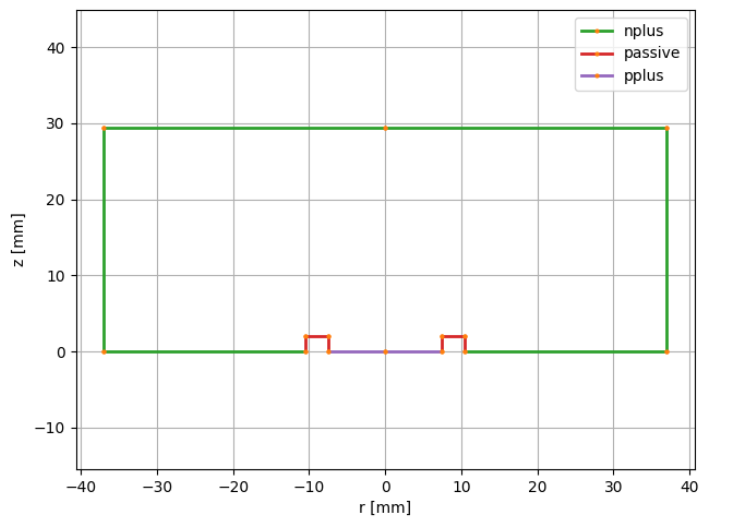
We can also directly extract the \((r,z)\) profile and the surface types and surface area of each.
>>> r, z = hpge.get_profile()
>>> hpge.surfaces
['pplus', 'passive', 'passive', 'passive', 'nplus', 'nplus', 'nplus']
>>> sum(hpge.surface_area())
<Quantity(13775.3258, 'millimeter ** 2')>
>>> hpge.surface_area(hpge.surfaces.index("nplus"))
<Quantity(2202.854609407688, 'millimeter ** 2')>
Here the surfaces correspond to the line from \(r_i\) to \(r_{i+1}\) and \(z_i\) to \(z_{i+1}\).
We can also easily extract the detector mass and volume:
>>> hpge.mass
<Quantity(700.577026, 'gram')>
>>> hpge.volume
<Quantity(126226.526, 'millimeter ** 3')>
Finally we can compute the distance of a set of points to the electrodes:
>>> hpge.distance_to_surface([(0, 0, 1), (0, 0, 99)])  # x, y, z
array([ 1.  , 69.54])
and check whether a point is inside the detector:
>>> hpge.is_inside([(0, 0, 1), (0, 0, 99)])  # x, y, z
array([ True, False])
Use in a Geant4 simulation
The HPGe object derives from pyg4ometry.geant4.LogicalVolume and can be
used to visualise the detector in 3D, or to run Geant4 simulations.
For example to visualise a detector we can use:
# create a world volume
world_s = pg4.geant4.solid.Orb("World_s", 20, registry=reg, lunit="cm")
world_l = pg4.geant4.LogicalVolume(world_s, "G4_Galactic", "World", registry=reg)
reg.setWorld(world_l)

# place the detector
pg4.geant4.PhysicalVolume(
    [0, 0, 0], [0, 0, 0, "cm"], hpge, "det", world_l, registry=reg
)

viewer = pg4.visualisation.VtkViewerColoured()
viewer.addLogicalVolume(reg.getWorldVolume())
viewer.view()
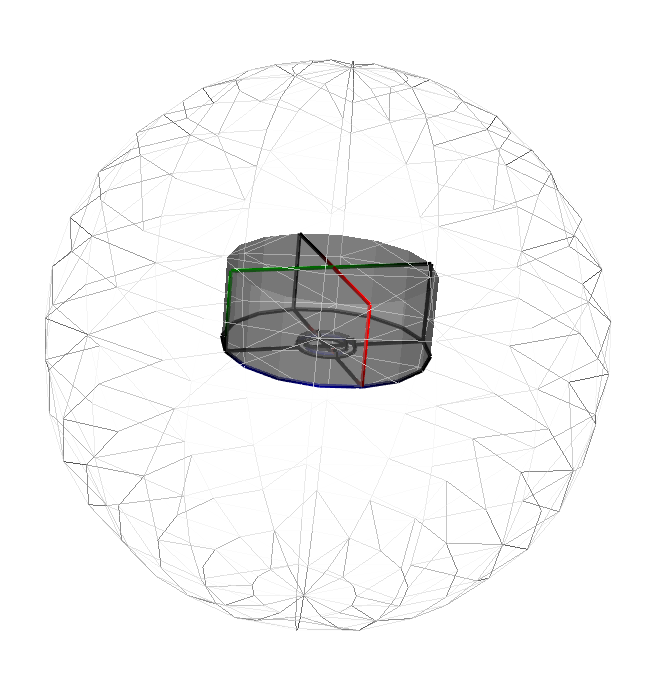
The remage tutorial gives a more complete example of using legendhpges to run a simulation.
This class is also the basis of the legend-pygeom-l200 implementation of the LEGEND-200 experiment,